
Create a candidate analysis
Compare one or more resumes with a role and generate structured hiring-manager reports.
Before you begin
Confirm you are a Member or Admin in the correct workspace and have available analysis allowance. Prepare a clear role brief and text-readable PDF or DOCX resumes. Each uploaded file must be no larger than 10 MB; select at most five uploaded files at once.
Adding a saved candidate reuses that candidate's available resume. Creating a profile alone does not guarantee that it has usable resume evidence. Check extraction status before selecting it.
1. Add role context
On New analysis, enter the job description directly or select a saved role from the job-description repository. The write and preview tabs let you check Markdown formatting before analysis. The line at the bottom of the editor shows how well the description will screen; open it for the JD coach, which can suggest fixes or draft a description from a brief.
A useful role brief includes responsibilities, must-have skills, seniority, location constraints, and the evidence a reviewer expects to see. Clear requirements produce a more auditable comparison.
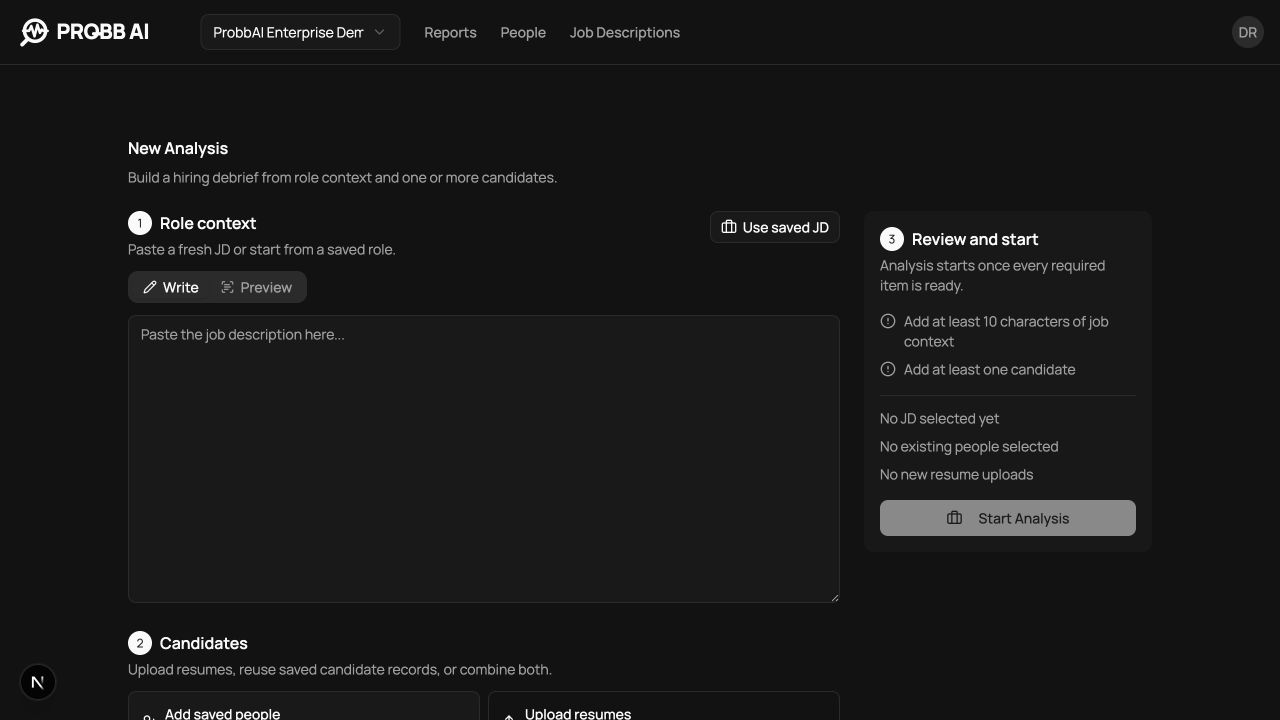
2. Add candidates
Drag resume files into the upload area, choose files, or select existing candidates. Batch analysis lets you prepare several candidates against the same role in one run. Review the roster and remove accidental files before starting.
You can combine saved candidates and new uploads. The start action becomes available after the role and at least one candidate are ready. The five-file limit applies to the new resume files you select.
3. Review and start
The review step summarises the role and candidate inputs. Start the analysis when every required item is ready. You can follow progress for each candidate in the batch.
Processing states
The progress view separates upload, extraction, and analysis so a slow or failed candidate does not hide the rest of the batch. Completed candidates can be opened independently.
When the resume and job description look like they are for different kinds of roles (for example, a nursing resume against a software engineering job), ProBB AI pauses before running the full hiring-manager report so you can check that the right files were picked. The pause shows what the job is hiring for and what the resume describes, and lets an authorised reviewer go back to reports or choose Continue anyway.
Gaps in seniority, years of experience, licenses, or clearances never pause an analysis. They appear in the full report instead.
If a candidate does not finish
Open the failed or paused item before starting again. A file validation error needs a corrected document; a mismatch needs a human decision about whether the candidate and role are the intended pair. A workspace-limit message needs available allowance or active work to finish.
Other candidates can finish independently. Keep their completed reports and retry only the affected item through the available action. Replacing the source resume later does not rewrite an already generated report.
Output
A completed analysis creates:
- candidate identity and experience context;
- role-fit score and reasoning;
- requirement-by-requirement evidence;
- strengths, gaps, discrepancies, and integrity signals;
- hiring-manager follow-up prompts;
- a candidate-specific interview question bank;
- a saved candidate, job description, and report relationship where applicable.
See Reports for how to review and act on the result.